
Wi-Fi Connection
Setup a printer.
Follow the steps below.
 Note
Note
- Notes on Wi-Fi Connection (Appears in a new window)
-
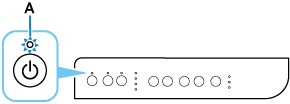
Make sure printer is turned on before starting wireless connection setup.
If the power is on, the ON lamp (A) will be lit.
 Important
- If printer is performing cleaning, print head alignment, or other processes, wait for the process to finish, before starting setup.
-
Check that wireless router is on.
If it is already turned on, turn it off, and then turn it back on.
Do not proceed to the next screen of this guide until the power is turned on. The connection to the wireless router will be temporarily disabled.
